A real project case study on mapping an existing Shopify product setup to a custom 3D outdoor furniture experience.
Project at a Glance
- Item
- Project fact
- Client
- Outer
- Commerce platform
- Shopify
- INTR contribution
- Custom 3D configurator experience and product-option mapping
- Customer journey
- Three stages: Outdoor Lounge; Coffee & Fire Tables; Side Tables & Accessories
- Live configurator
- https://liveouter.com/pages/3d-configurator
- INTR visual case
- https://www.3dintr.com/en/cases/outer-3d-backyard-design/
Introduction
When we began the Outer project, the starting point was not a blank e-commerce system. Outer already ran its online store on Shopify and had its product setup and commercial settings in place. The opportunity was to give customers a more visual way to explore and assemble outdoor furniture without rebuilding the store behind it.
We developed a custom 3D configurator that brings product choices into an interactive environment. Customers can explore modular lounge arrangements, change fabric choices, add tables and accessories, and review their selections as part of a guided three-step experience. The configurator is presented through Outer’s Shopify storefront, while the store’s established commerce workflow remains in place.
This page documents the decisions and work involved in that project: what was already managed by Shopify, what INTR built for the new experience, how product choices were represented in 3D, and what clients receive when a custom project is completed.
1. What Was Already in Place Before the 3D Work
Outer already had a functioning Shopify store. Its product catalogue, product options, variants and commercial settings were managed in the existing store. That matters because a 3D configurator does not automatically require a separate product database or a replacement commerce platform.
For this project, we treated the existing Shopify product setup as the reference for the choices customers would make. The work was not to recreate product administration, inventory management, pricing rules or the store’s purchase process in a second system. It was to make the relevant existing choices available through a new, product-specific interface.
That starting point shaped the scope. Instead of asking the brand to move its products into a new platform, we focused on how customers could make those choices in a more intuitive way and see the result in a 3D scene. The existing store remained the commercial foundation; the configurator supplied a new way to interact with the products.
2. What Had to Be Decided Before Any 3D Work Began
Before building the visual experience, we needed to understand how the product was organised and how customers were expected to configure it. A product configurator is not just a collection of attractive buttons. Each control needs a clear meaning, a valid choice and a predictable effect on the product being shown.
For modular outdoor furniture, a customer may be choosing a seating arrangement, a fabric, a table or an accessory. Those choices do not all behave in the same way. Some change the visible construction of the furniture, some change its material appearance, and others add a separate item to the overall arrangement. The interface needs to make those differences understandable.
We therefore approached the work as a mapping problem before treating it as a rendering problem: identify the choices already defined for the store, determine how each choice should appear in the configurator, and specify what should change in the 3D experience when a customer selects it.
This is not an argument for or against configurator apps — it is a record of one project’s scoping. A ready-made app may be suitable for a simpler product or a standard workflow. In Outer’s case, the requirement was to create a particular furniture-selection experience around the product setup that already existed.
3. Mapping Existing Product Choices to 3D Controls
The central implementation task was to connect the choices presented in the new configurator with the corresponding product choices and parameters already used by the store. We designed the visible controls around the way customers understand the furniture, while keeping those controls aligned with the existing product setup.
It is important not to confuse a configurator button with a SKU. A button is an interaction control. It may represent an option or an option value; the purchasable product or variant is determined by the store’s product structure. A single configuration can involve different kinds of choices, and not every visible control represents a separate stock-keeping unit.
This distinction helps keep the product experience understandable without creating a parallel catalogue. The customer sees a clear set of controls. The 3D scene responds to the selection. The relevant product choice remains connected to the store’s existing commerce context.
The same principle applies when a brand has several product families. The configurator should reflect the actual options available for the product being configured. It should not imply that every product has the same materials, colours, combinations or availability.
4. Turning the Choices into a Three-Step Furniture Experience
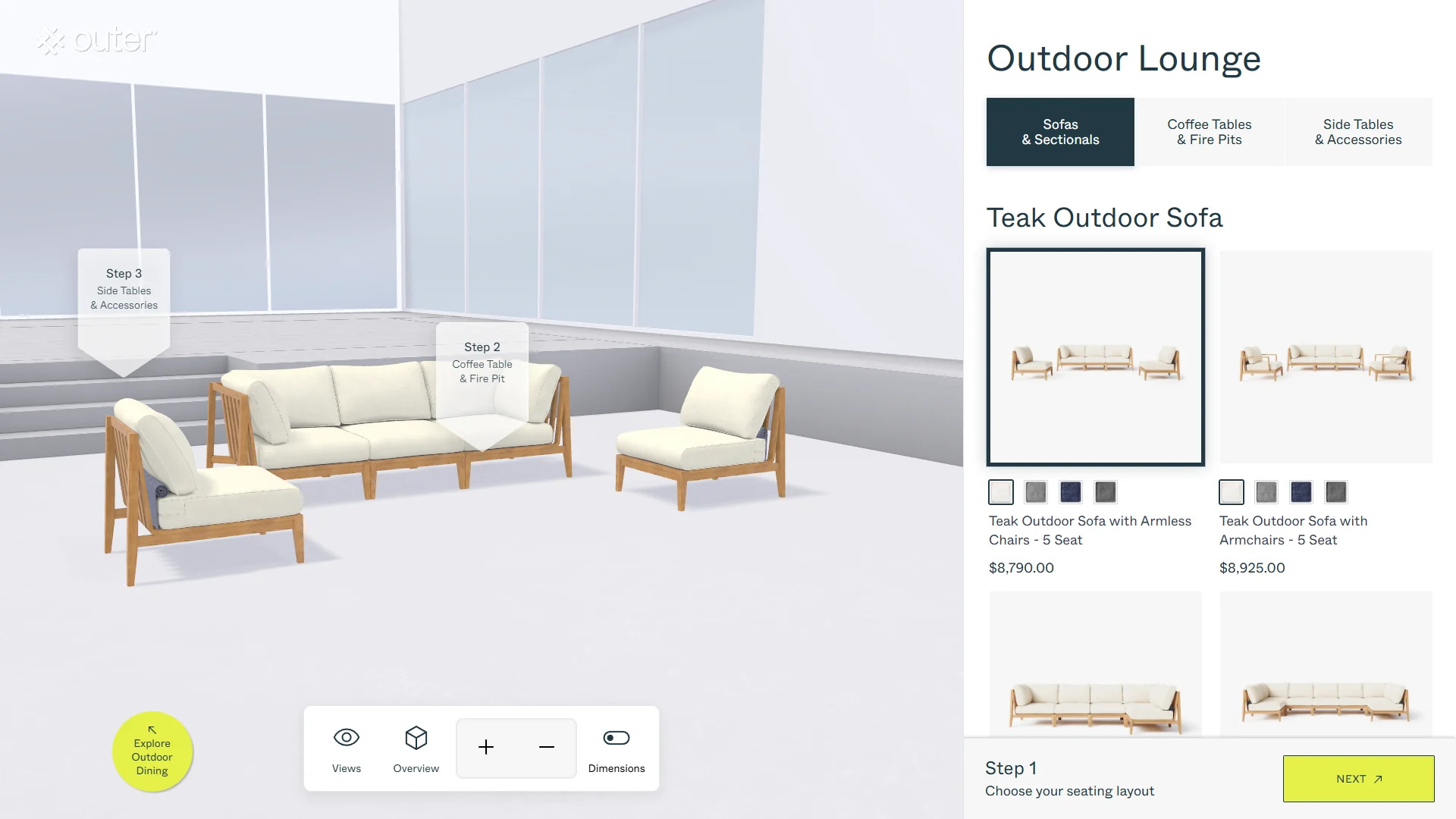
Outer’s configurator organises the selection journey into three stages. The live interface labels them Outdoor Lounge, Coffee & Fire Tables, and Side Tables & Accessories. This gives customers a clear path through the main parts of an outdoor arrangement rather than presenting every possible choice in one long list.
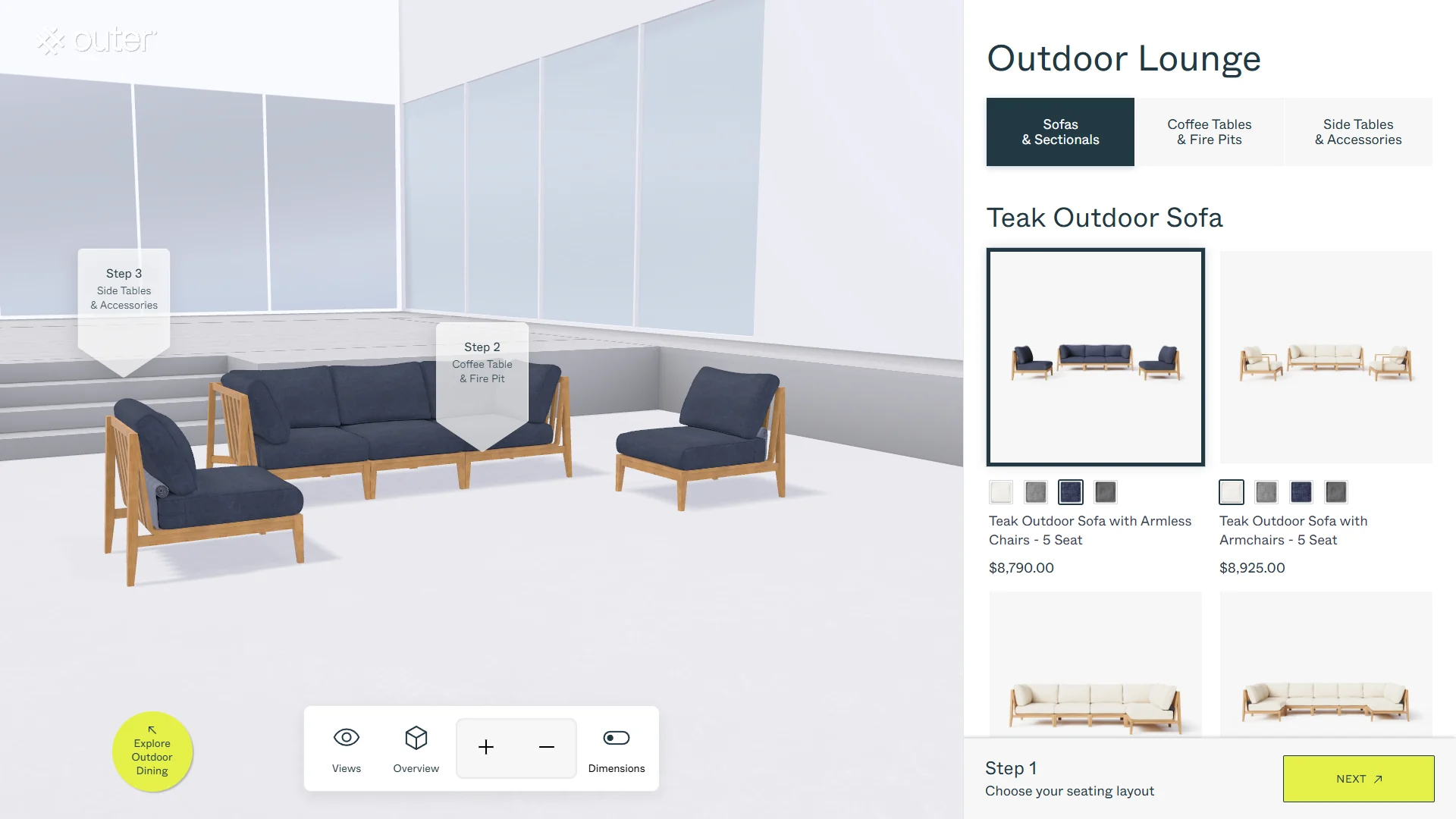
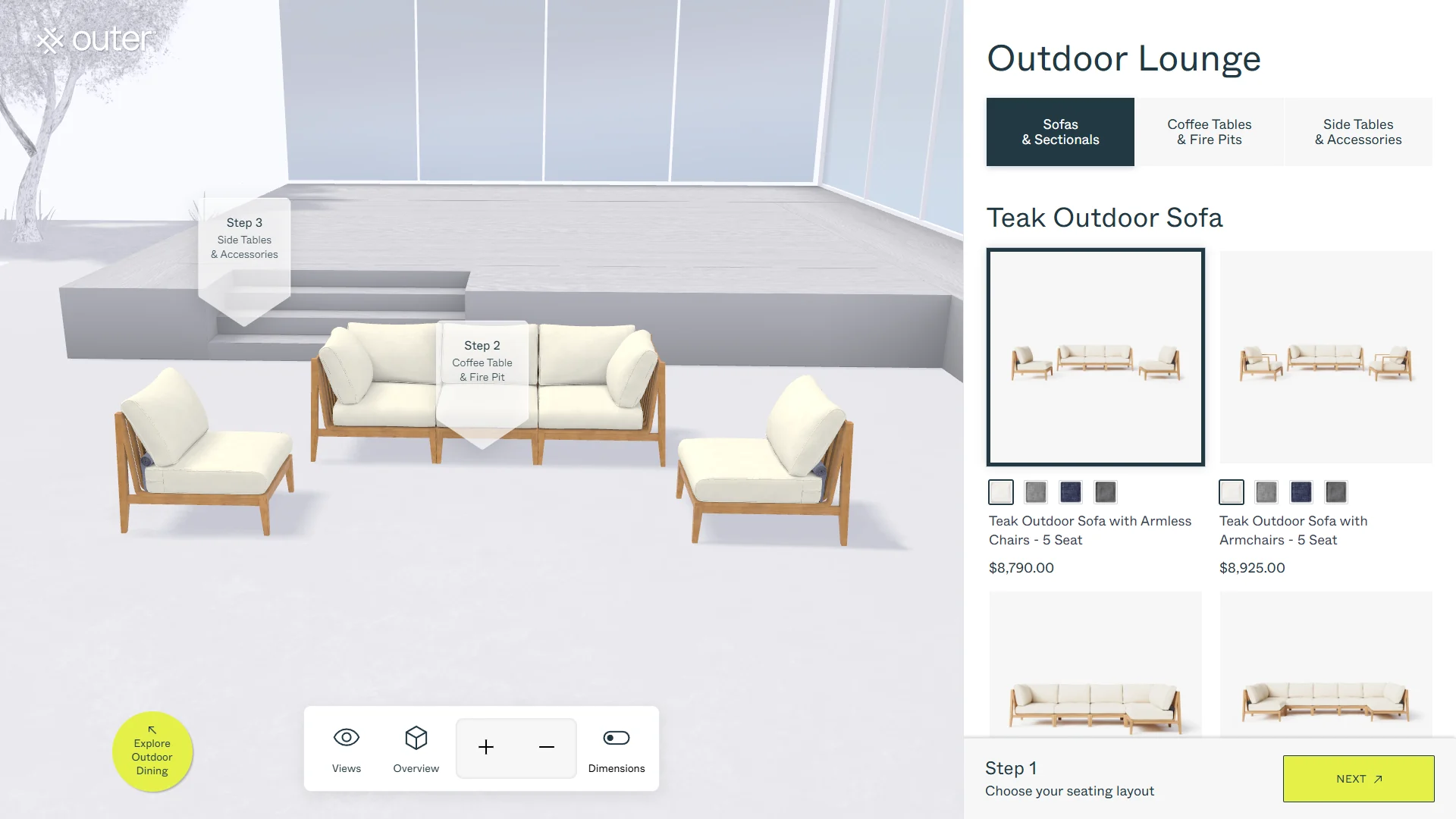
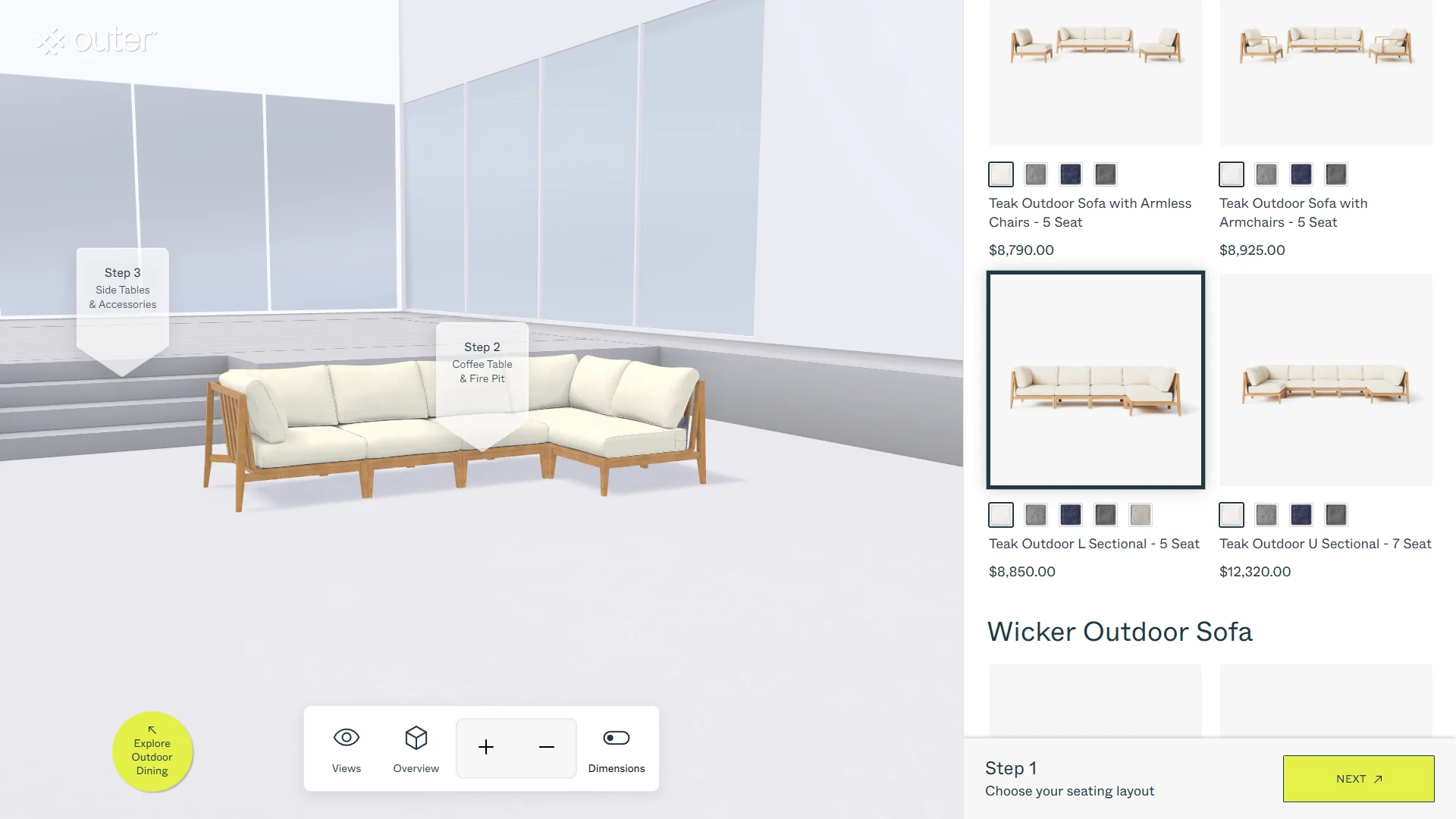
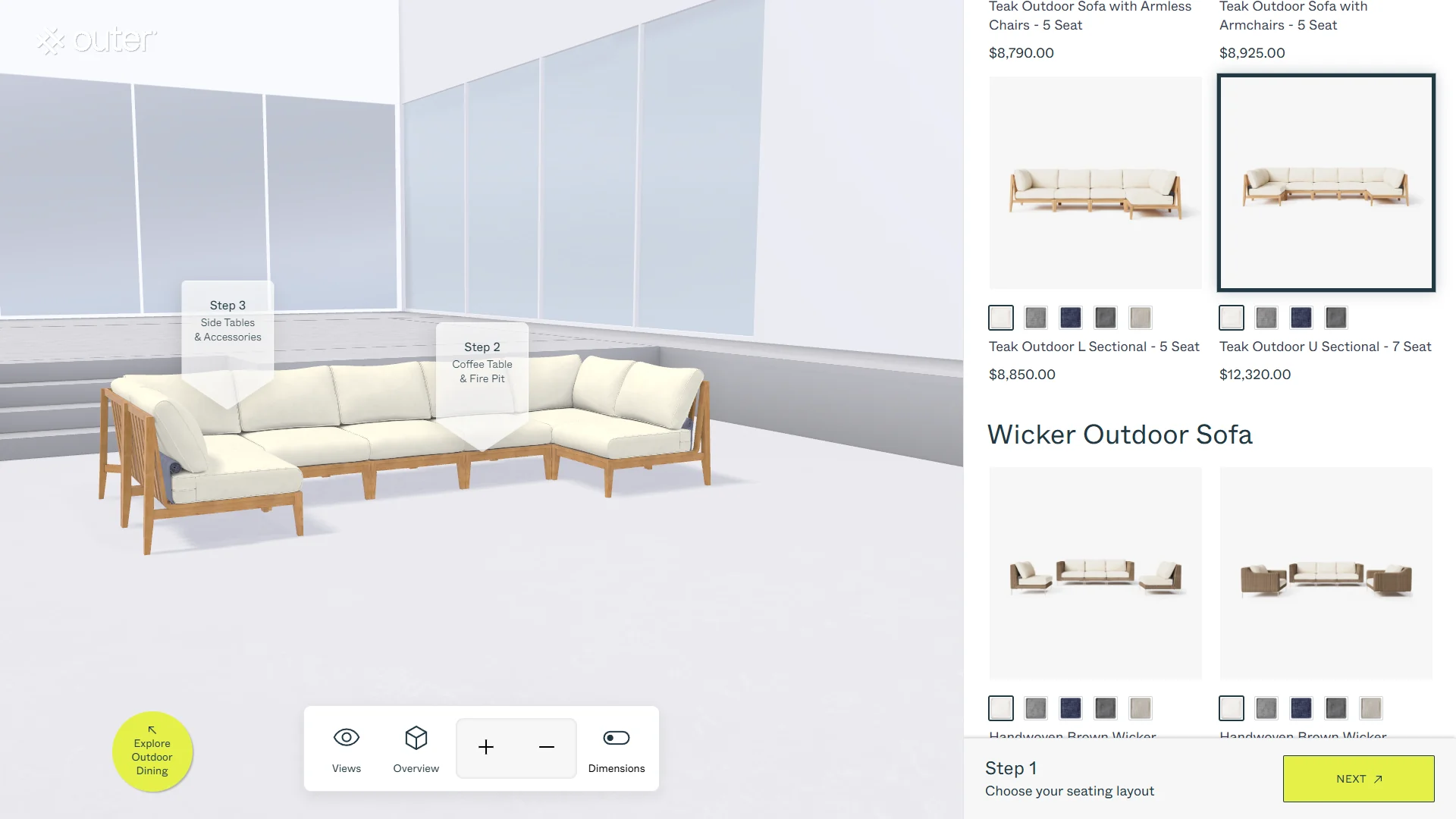
In the Outdoor Lounge stage, customers can explore different modular seating arrangements. The captured project states include a five-seat armless arrangement as well as L-shaped and U-shaped sectional layouts. These are useful examples because the difference is structural: customers are not simply changing a colour swatch; they are seeing a different furniture arrangement in the scene.
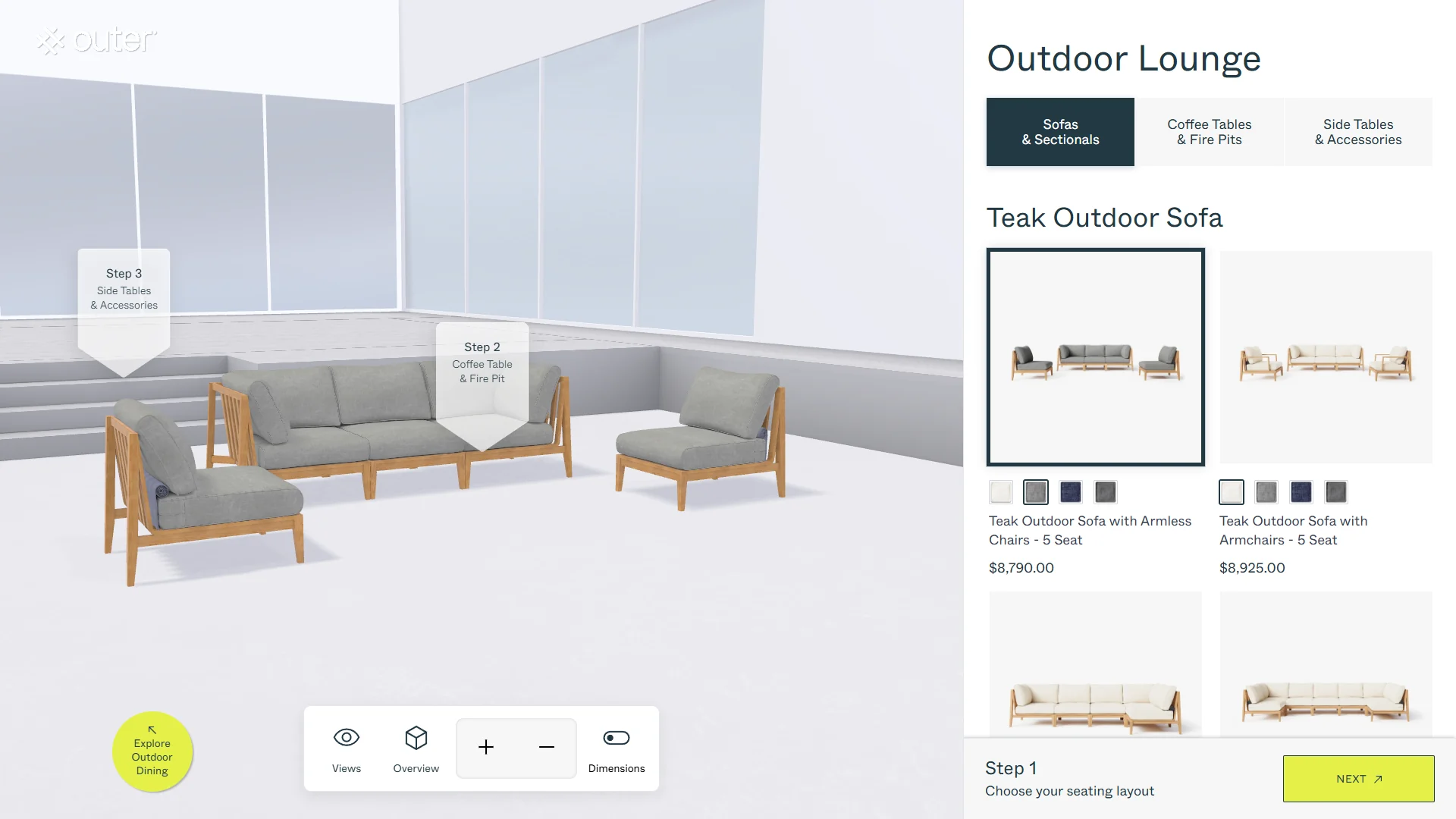
The fabric controls provide another kind of choice. The fabric names observed across the configurator include Palisades Cream, Pacific Fog Gray, Deep Sea Navy, Dark Pebble Gray and Sandstone Gray. Some individual product cards show four visible colour swatches; the available set can vary by product. The five names should therefore not be read as a promise that every product offers all five choices.
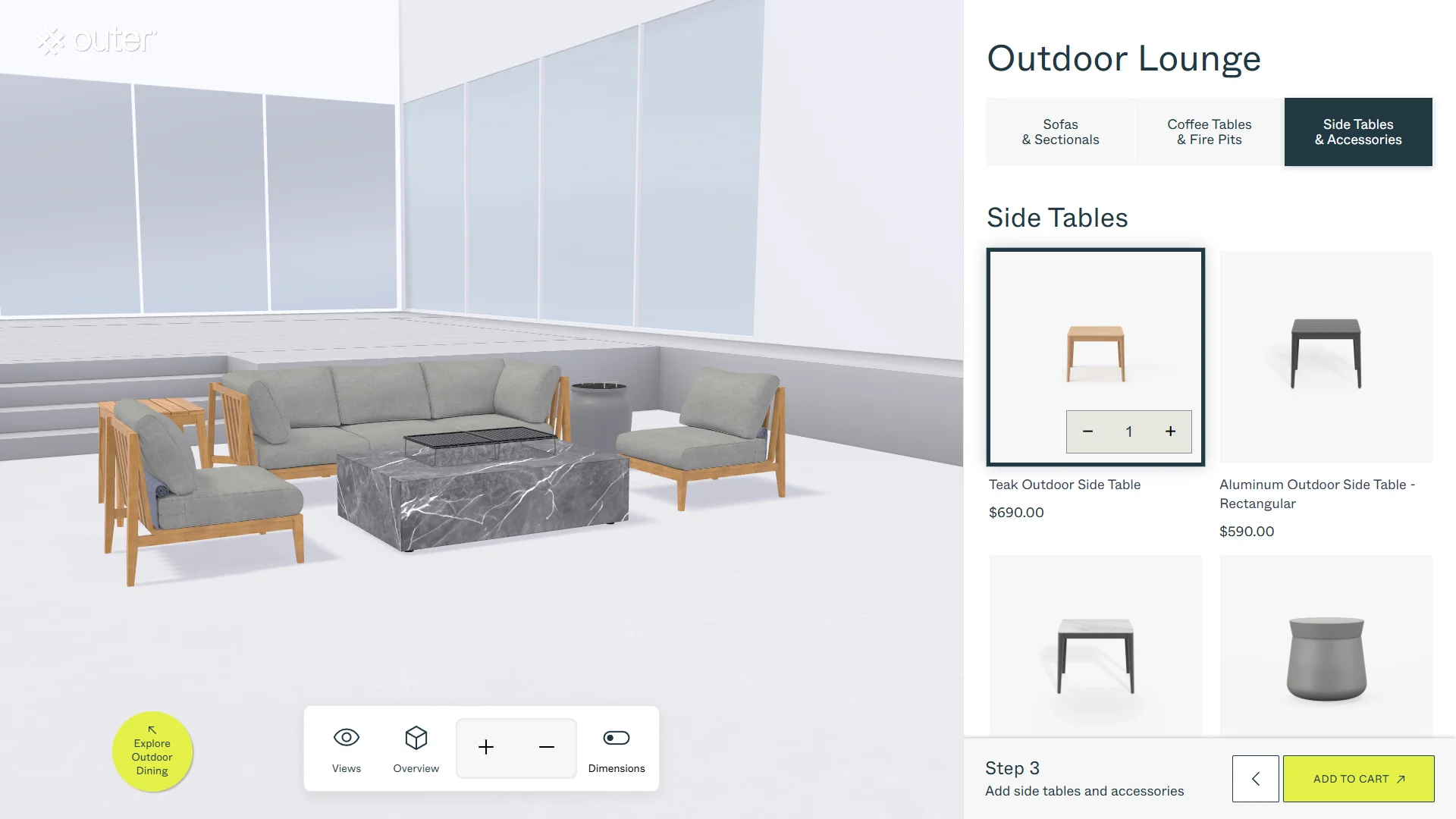
The next stages let customers bring tables and accessories into the overall arrangement. The captured examples include an OuterStone fire-pit coffee table and a teak side table. An on-screen ‘Explore Outdoor Dining’ entry point is also visible in the experience. Together, these controls help customers move from selecting one furniture component to considering a more complete outdoor setting.
5. Showing the Result, Not Just the Selected Option
The value of a 3D configurator is in the relationship between a choice and the result it produces. A selected label can tell a customer what they chose; a responsive 3D scene can help them understand how that choice changes the furniture they are considering.
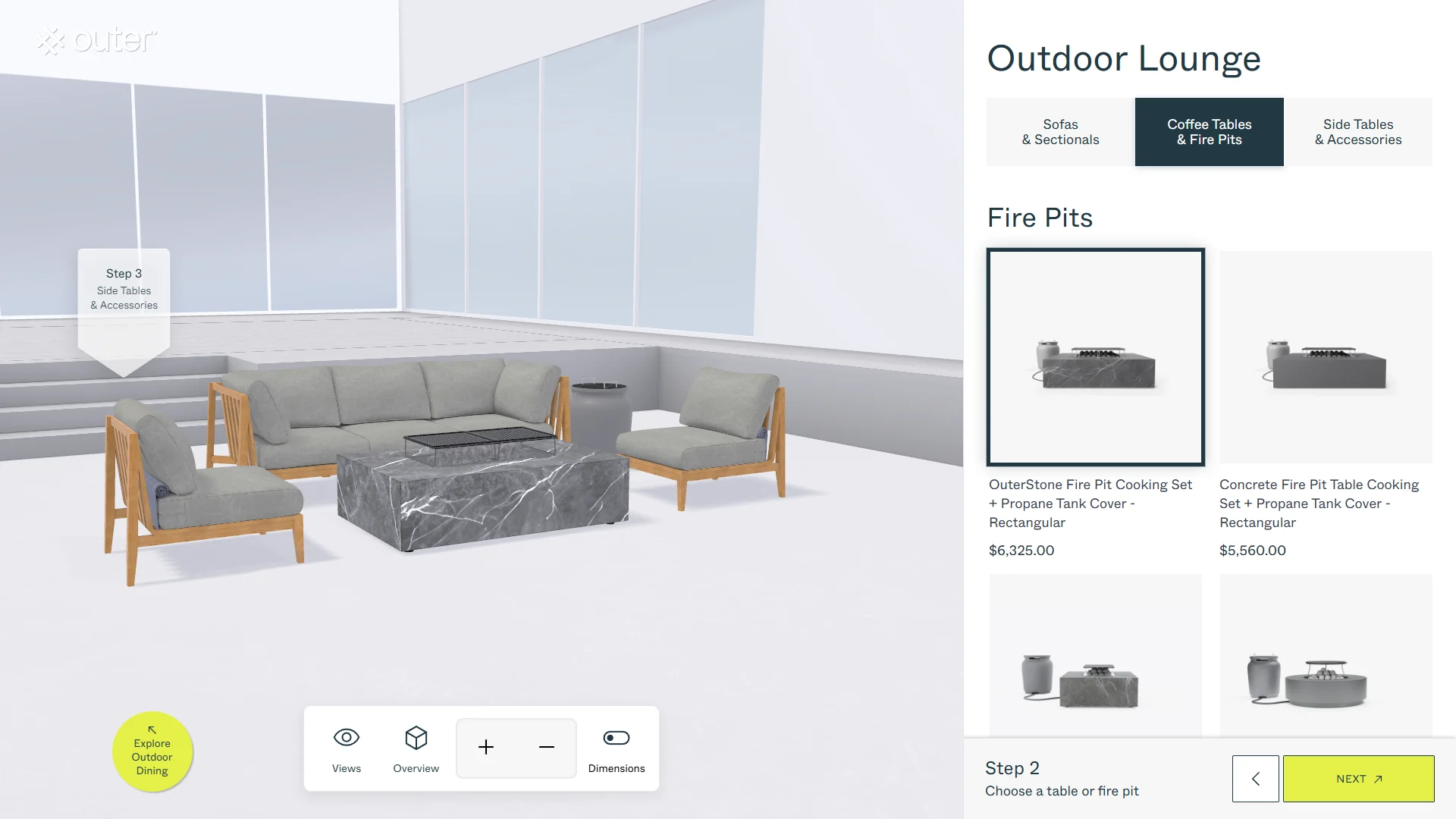
In the Outer experience, the captured states show different sofa arrangements, fabric appearances and added furniture pieces. The customer can inspect the scene from different viewpoints rather than relying only on a set of separate product photographs. This is especially relevant when the product is modular and the final arrangement depends on several selections.
The interface also keeps the selection process structured. Customers move through distinct stages, see the available choices in context, and can review what has been assembled. The aim is not to add 3D for decoration. It is to make product options easier to interpret while the customer is making a decision.
6. Keeping the Existing Shopify Shopping Workflow
A configurator needs a clear next step after selection. For Outer, the experience connects the configured selection to the store’s existing shopping journey, including the cart and checkout steps. The 3D scene is part of the buying journey, not a disconnected demonstration.
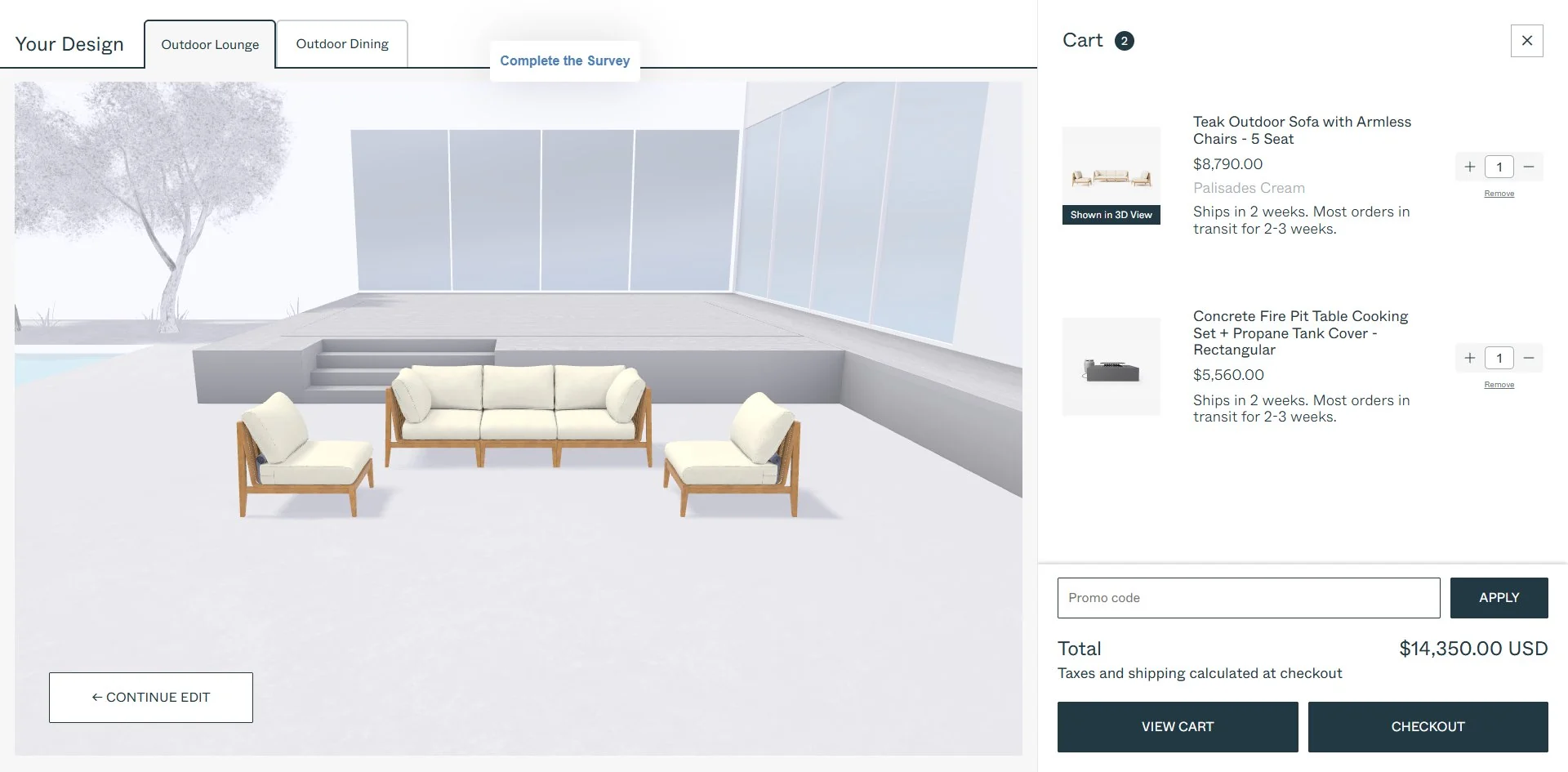
The important project decision was to keep the established commerce system in place. Shopify remained the store’s product and purchasing environment. The custom configurator provided the new selection interface and connected the selection process to that existing workflow.
A cart capture from 2 November 2026 showed the selected furniture items, their displayed prices and a combined cart total. This is a snapshot of one live session, not a fixed price list or a quote. Product prices, offers, tax treatment and availability can change over time or by market, so the article does not reproduce those amounts as enduring product facts.
The screenshots demonstrate the visible path from configuration to cart. They should not be used to infer private implementation details, such as a particular API, internal data structure or exactly how every configuration attribute is represented in an order record. Those details are not necessary to explain the customer-facing value of this project.
7. Why the Interface Was Designed Around the Product
A furniture configurator has to do more than display a 3D model beside a list of options. The controls, steps and visual feedback need to reflect how the actual product is selected. A modular sofa, a table and an accessory have different roles in the final arrangement, so the interface should help customers understand those roles as they make choices.
That is why the Outer experience uses a guided sequence and presents the available options alongside the 3D scene. The interface is specific to the product and to the selection journey being supported. It is not simply a generic form placed next to a model.
This approach can be relevant to other brands with products that have meaningful visual or structural choices. The exact design will depend on the product catalogue, valid combinations, visual assets and the purchase journey. A configurator should be planned around those realities rather than assuming that one control pattern fits every product.
8. Project Handover: Source Files and Source Code
A completed custom configurator is a project deliverable, not only a hosted screen that a client can access while a subscription remains active. Upon project completion, INTR delivers the project source files and source code to the client.
This handover gives the client the project materials and code associated with the work, so the result is not limited to access through a third-party configurator account. It is an important part of how INTR approaches custom development: the engagement is built around the client’s product and requirements, and the completed project is handed over with its source files and source code.
The precise treatment of third-party licensed components and separately licensed resources remains subject to their applicable licences. Source-code delivery should not be confused with a blanket transfer of rights to third-party software or assets.
9. What Other Shopify Brands Can Take from the Outer Project
The Outer project is a practical example of adding a custom 3D experience around an existing Shopify product setup. It does not suggest that every store needs a custom configurator, or that standard apps are unsuitable. The right approach depends on the product, the number and relationships of its options, the required visual experience and the existing shopping workflow.
For a brand considering a similar project, we recommend reviewing a few things before development begins: the existing product catalogue; the options and values available for each product; how those choices relate to variants and purchasable items; the materials and 3D assets available; what should change visually when a choice is made; and how the final selection should continue into the store’s cart and checkout process.
It is also useful to decide what the customer should be able to understand before adding a product to the cart. For some products, that may be colour and finish. For modular furniture, it may include layout, components, materials and complementary items. The more clearly the decisions are defined, the easier it is to design a configurator that supports the real purchase journey.
For Outer, the goal was to bring its existing product choices into a more visual, guided experience while keeping the established Shopify commerce workflow. That is the central lesson of the project: a brand can rethink how customers configure a product without automatically replacing the system that already manages the store.
Conclusion
The Outer configurator shows how a custom 3D experience can be built around an existing Shopify product setup. INTR focused on mapping existing product choices to a new set of 3D controls, presenting modular outdoor furniture in a guided three-step journey, and connecting the experience to the store’s established shopping process.
For brands with products that are difficult to understand through static options alone, this can be a useful way to make configuration more visual and more product-specific. The starting point is not to rebuild everything. It is to understand what the current store already does, identify what the customer experience is missing, and build the right interactive layer around it.
Explore the Outer 3D configurator , view the Outer project on INTR , or contact INTR to discuss a custom 3D product experience.
Frequently Asked Questions
Can a custom 3D configurator be added to an existing Shopify store without rebuilding the backend?
In many cases, yes. If a store already manages its product setup and commerce workflow through Shopify, a custom configurator can be designed around the relevant existing product choices. The exact approach depends on the product structure and the intended customer journey.
How does a Shopify 3D configurator use existing product options?
The configurator’s controls can be mapped to the product options and values already maintained for the store. The customer’s selection then drives the corresponding visual state in the 3D experience and continues into the existing shopping workflow.
Does every configurator button need its own SKU?
No. A button is an interaction control and may represent an option or option value. The purchasable product or variant depends on the store’s product structure; a visible control should not automatically be treated as a separate SKU.
Does every Outer product have all five fabric choices?
No such general claim should be made. Five fabric names were observed across the configurator, while the swatches shown on an individual product card can vary by product. Customers should refer to the options displayed for the specific item they are configuring.
Does INTR deliver the project source files and source code?
Yes. Upon project completion, INTR delivers the project source files and source code to the client. Third-party licensed software and separately licensed resources remain subject to their applicable licences.
About the Author
Ziming Hu is the founder of INTR, a studio focused on custom interactive 3D web experiences. He works with product brands to turn complex product choices into browser-based experiences for product exploration, configuration and digital commerce.