Digitizing a product manual means making product information easier to find, understand, and maintain—not simply converting a PDF into a web page. Manufacturers can structure existing content, connect instructions to product components, and add browser-based 3D interaction where spatial understanding matters, while keeping approved PDFs available for download, controlled reference, and archiving.
The practical route is usually incremental: audit the current technical publication, identify the tasks users struggle with, choose a small number of high-value improvements, and test them before expanding the digital manual across a product family.
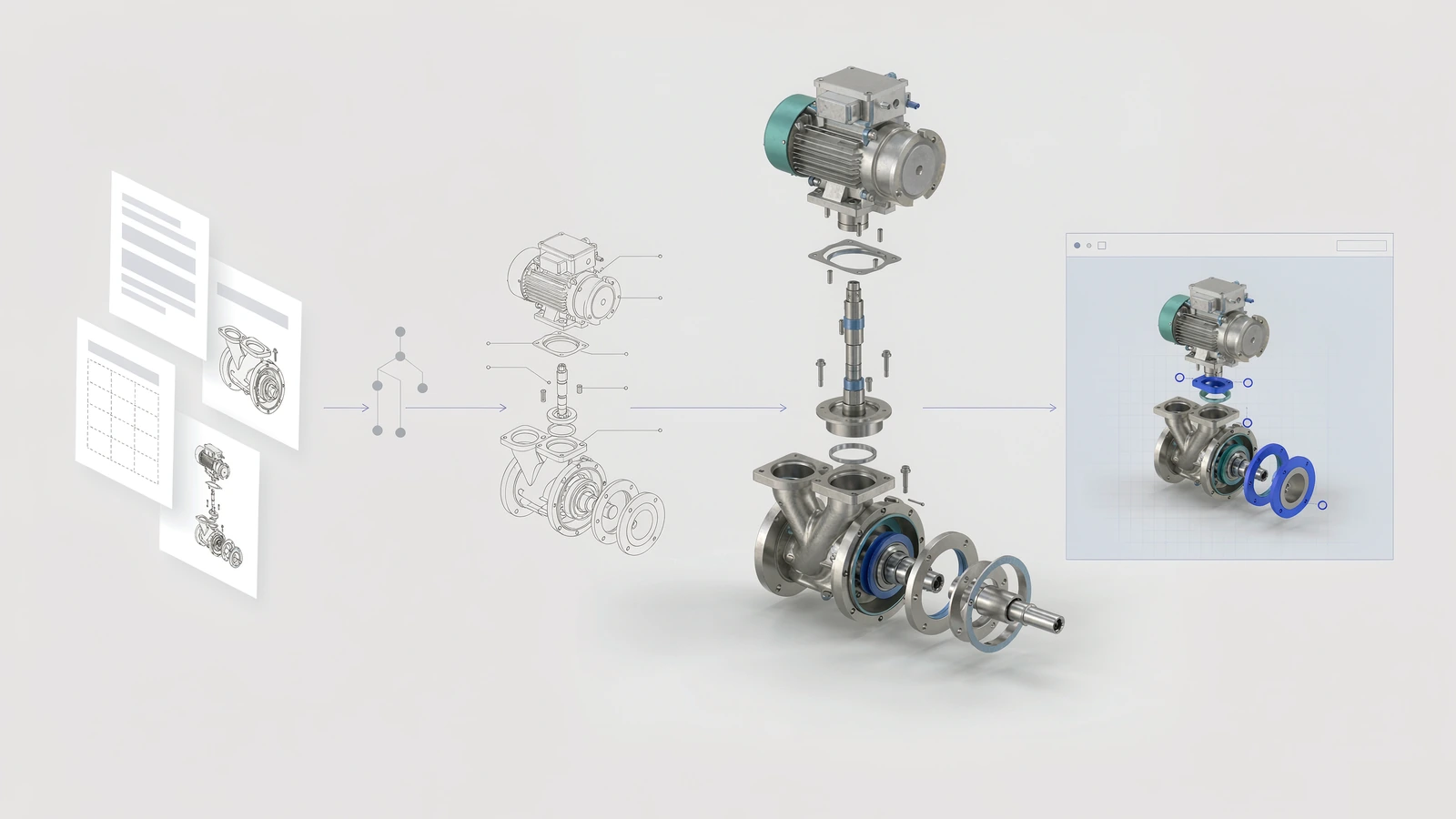
A practical digitization workflow starts with existing technical information and adds 3D interaction where it helps users understand the product.
What Does It Mean to Digitize a Product Manual?
A digital manual is a product-information experience delivered digitally. At the simplest level, it may be a searchable PDF or an online document library. A more interactive experience can combine structured text, diagrams, product data, video, a 3D model, selectable components, hotspots, and guided steps in a browser.
The important distinction is between making a document available online and organizing information around the task a user needs to complete. A user who needs to identify a component should not have to guess which file or page contains the answer. A user following an assembly or service procedure may benefit from seeing the relevant part highlighted in the product itself.
Digitization does not require every part of the manual to become interactive. The right format depends on the information and the user’s task.
Start With the User’s Task, Not the File Format
Before selecting a platform, rebuilding documents, or preparing 3D assets, list the common questions users need the manual to answer:
- Which product version or component am I looking at?
- Where is the part located in the assembly?
- What is the correct sequence for installation, assembly, inspection, or maintenance?
- Which specifications or warnings must I confirm?
- Where can I download the approved reference document?
These questions help teams distinguish between information that needs better navigation, information that needs a visual explanation, and information that must remain a controlled reference.
Match each information type to an appropriate format
| Information or task | A practical format | Why it fits |
|---|---|---|
| Specifications, dimensions, formal warnings, revision-controlled reference | Approved PDF or controlled document, with searchable HTML where useful | Preserves a stable reference and supports precise lookup |
| Part identification and spatial relationships | Interactive 3D view, selectable components, or hotspots | Lets users inspect the relevant area rather than infer its location from a static image |
| Assembly, installation, or service sequence | Numbered steps with diagrams, animation, or 3D states where helpful | Connects each action to the correct product state |
| Troubleshooting and frequently asked questions | Searchable web content linked to the relevant product or component | Makes common answers easier to discover and maintain |
| Archived editions and formal downloads | Versioned PDF or document repository | Retains a traceable reference to a specific release |
This is not a rule that 3D is always better. If an interaction does not reduce ambiguity or help users complete a task, it may add cost without adding value.
A Six-Stage Roadmap for Digitizing Product Manuals
1. Audit the existing technical publication
Collect the manuals, diagrams, product specifications, parts lists, installation procedures, service instructions, warnings, supporting media, and downloadable documents already in use. Record the product family, document owner, language, revision, intended audience, and how often the material changes.
The audit should also identify duplication and uncertainty. If two documents describe the same procedure differently, digitizing both without resolving the conflict can make the problem harder to detect. Confirm the authoritative source before creating a new presentation layer.
Deliverable: a content inventory with an identified source of truth for each important item.
2. Map content to real user journeys
Group information around tasks rather than mirroring the original table of contents automatically. A service journey might run from product identification to component selection, procedure, warning, and reference download. An assembly journey may begin with the complete product, move through a set of parts, and then follow a sequence of steps.
Make sure every step answers a concrete question. Avoid building a complex navigation system simply because the existing documentation contains many sections.
Deliverable: a task map showing the entry point, required information, next action, and relevant reference document.
3. Assess the available 3D and visual assets
Look for existing CAD-derived assets, web-ready 3D models, product photography, exploded views, line drawings, and animation. Existing engineering geometry may be a useful starting point, but it does not automatically make a suitable browser asset. The required preparation depends on product complexity, visual quality, file size, performance targets, and which parts users need to inspect.
Do not assume that the entire assembly must be modeled or displayed at maximum detail. A focused model of the relevant components may communicate the procedure more clearly and perform better on mobile devices.
Deliverable: an asset-readiness list with gaps, dependencies, and a realistic scope for the first release.
4. Add interaction only where it improves understanding
Interactive 3D product documentation can include selectable parts, hotspots, exploded views, section views, camera presets, animation states, or guided steps. Choose each feature to address a documented user need:
- “Where is this part?” — highlight it and show its component name.
- “How does it relate to nearby parts?” — use an exploded or separated view.
- “What is hidden inside?” — expose the relevant internal area with an appropriate section or visibility state.
- “What should happen next?” — show a step-by-step sequence with text and visual confirmation.
Keep essential instructions available as text. The 3D scene should support the task, not become the only place where a warning or critical step is explained.
Deliverable: a defined interaction scope linked to specific user questions and content items.
5. Preserve document control and revision ownership
A digital manual needs an update process, not just a launch date. Define who approves technical content, who updates the 3D layer, how product revisions map to documentation revisions, and how older PDFs are retained or marked as superseded.
When a product changes, determine which content is affected: the model, component metadata, diagrams, instructions, translations, links, or downloadable documents. A small change may not require every layer to be republished, but affected content must be reviewed before release.
For formal or safety-critical information, follow the manufacturer’s applicable approval, release, and retention process. A web experience should not silently replace an approved document or imply regulatory compliance without validation.
Deliverable: a documented versioning and approval workflow, including the owner of each content layer.
6. Pilot, test, and expand
Choose a product or procedure where the user problem is visible and the source material is reasonably available. Test the pilot with the people who actually use the information: customers, technicians, installers, dealers, or support staff, depending on the intended audience.
Check more than visual appearance. Confirm that users can identify the right product and component, understand the sequence, read labels on mobile, access the PDF, navigate without a 3D interaction, and recover when an asset takes time to load or is unavailable.
Agree on evaluation measures before the pilot. Useful observations may include task completion, navigation errors, unanswered support questions, feedback from users, and the effort required to update the content. Set a baseline where possible; do not assume a business improvement before it has been measured.
Deliverable: a reviewed pilot, a list of fixes, and a reasoned decision about whether to expand.
How Should a Digital Manual Work With Existing PDFs?
A practical model is to let the interactive experience help users understand the product, while retaining the PDF as a formal or downloadable reference when needed.
The web experience can provide product context, component navigation, visual explanations, guided steps, and links to related documentation. The PDF can continue to serve detailed specifications, approved statements, archived editions, print requirements, and other material that users need in a stable document form.
The connection between these layers matters. Label the document clearly, show its revision or publication date when available, and make sure that a user can tell whether it is the current approved reference. Where both web content and a PDF present the same instruction, define how their consistency will be checked after an update.
The goal is not to maintain two conflicting sources. It is to assign a clear role to each format and a clear owner to each piece of information.
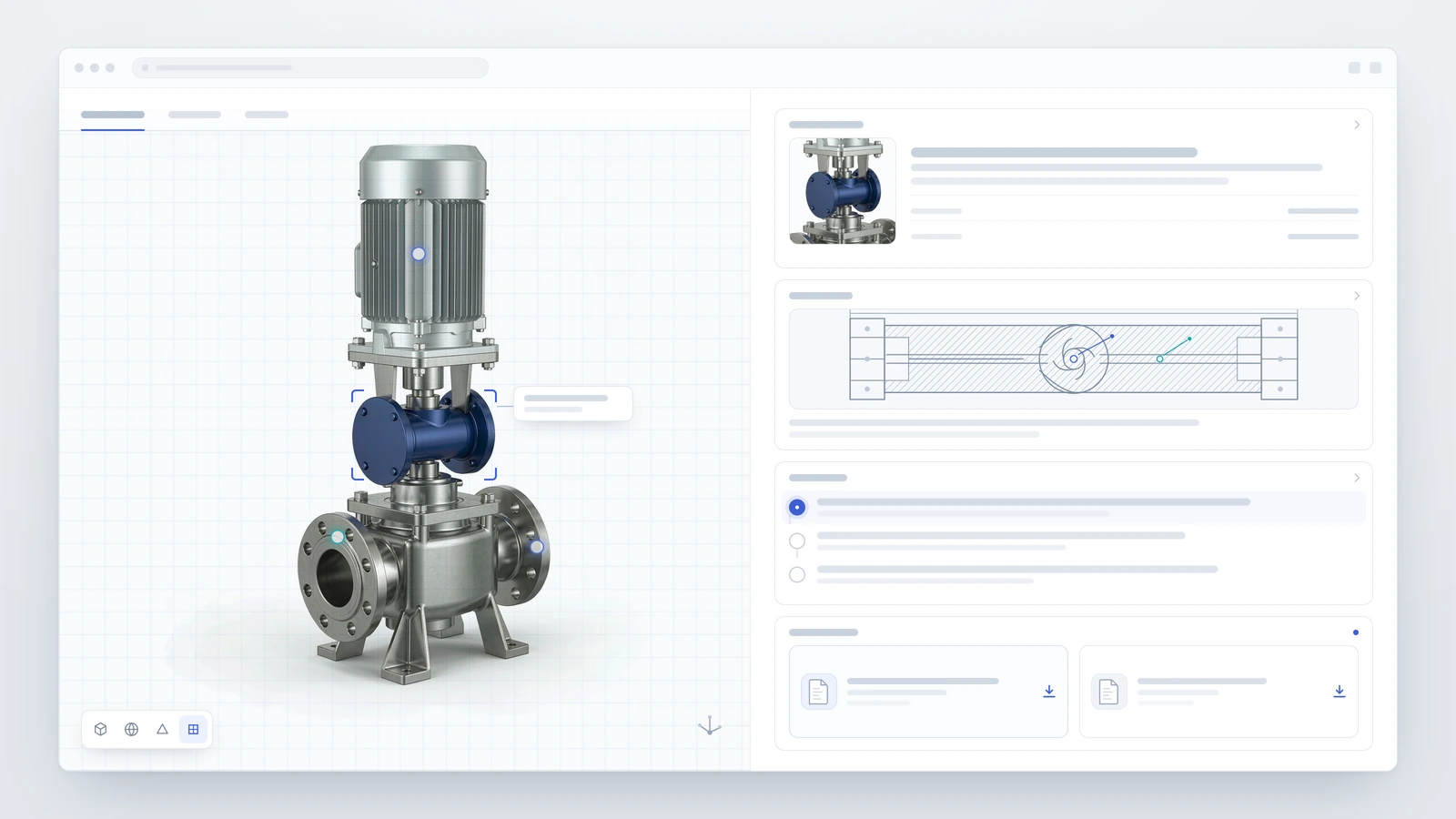
A hybrid digital manual combines spatial product guidance with technical references and downloadable documents.
Common Mistakes to Avoid
Converting every page without prioritizing tasks. A page-by-page conversion can preserve the original information architecture even when users find it difficult to navigate. Start with the most important user tasks.
Treating 3D as decoration. A model that users cannot relate to a procedure may look impressive but fail to answer the question. Connect selection, camera state, label, and instruction intentionally.
Rebuilding assets that already exist. Audit available 3D data, drawings, and approved documentation before estimating new production work. Reuse may be possible, but asset suitability still needs to be checked.
Ignoring document governance. If the model, steps, and PDF update independently, users may see conflicting information. Assign revision ownership before launch.
Making 3D the only route to important information. Provide text and accessible reference links for essential steps and warnings. Test touch interaction, performance, and fallback behavior on real devices.
Launching without a maintenance plan. Decide how feedback, product changes, broken links, translations, and outdated versions will be handled after launch.
A Readiness Checklist
Before starting a digitization project, confirm that you can answer these questions:
- Which user task should become easier in the first release?
- Which document or team is the authoritative source for the technical content?
- Which existing PDFs, diagrams, product images, and 3D assets can be reused?
- Which parts genuinely benefit from interactive 3D, and which should remain conventional content?
- Who approves revisions and checks consistency between the web experience and formal documents?
- How will the experience be tested on desktop and mobile devices?
- How will the team evaluate the pilot and maintain the manual after launch?
If several answers are unknown, begin with the content audit and a limited pilot rather than committing to a full conversion immediately.
Frequently Asked Questions
Do we need to replace our existing PDF manuals?
No. A digital manual can link to approved PDFs and keep them available as formal references. The key is to make the role, revision, and ownership of each format clear.
Do all product manuals need interactive 3D?
No. 3D is most useful when component location, spatial relationships, hidden structure, or a physical sequence is difficult to explain through text and static diagrams. Straightforward specifications and reference tables may remain better as conventional content.
Can we start with existing manuals and 3D assets?
Usually, existing documents, images, drawings, and 3D files are sensible starting inputs. Their quality, revision status, completeness, and suitability for web delivery still need to be checked before reuse.
What is the difference between a digital manual and 3D work instructions?
A digital manual is the broader delivery experience for product information. 3D work instructions are a more specific approach for explaining tasks or procedures through a three-dimensional product view, often combined with text, diagrams, and steps.
How should a manufacturer begin?
Choose one product and one clearly defined user task. Audit the current content, map the journey, identify reusable assets, prototype only the interactions that solve the problem, and test with intended users before expanding to more products.
Turn Product Documentation Into a Clearer Web Experience
INTR builds custom Interactive 3D Product Manual experiences that combine product visualization, component exploration, hotspots, guided walkthroughs, and browser-based delivery. The right scope depends on the product, source assets, user tasks, and the role existing documents need to retain.